



True Skate overview: physics-driven mobile skateboarding
Additional Information:
Screenshots
Editor's Review:
Updated 2026-11-22
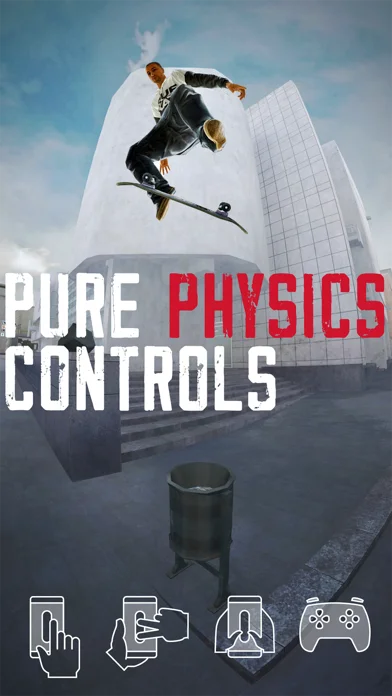
True Skate is a strong fit for players who want skateboarding to feel like a technical craft rather than a conventional character-action game. Its central idea is simple: you manipulate the board itself with your fingers, using flicks and swipes to control movement, popping, flipping, grinding, and recovery. The official description presents it as a physics-driven skateboarding simulator, and that emphasis defines the experience more clearly than any list of tricks could. Verdict: choose it if you enjoy practicing precise inputs and building lines; look elsewhere if you want an immediately accessible arcade sports game.
A board-first control system
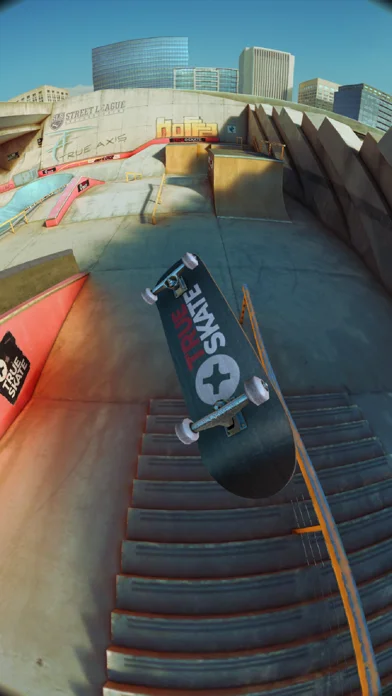
The gameplay loop revolves around entering a skatepark, gaining speed, attempting a line, and adjusting each trick through timing, angle, direction, and force. Dragging on the ground pushes the skateboard, while the location of a flick on the board changes how it reacts. That creates a meaningful decision at every attempt: a fast, forceful input may help produce height, but a misplaced or poorly timed motion can alter the trick or disrupt the line.
The game supports one-finger play, two-finger control, two-thumb play, and gamepad input. The store description also says the physics system processes swipe position, direction, and strength in real time. In practical terms, the documented design suggests a high skill ceiling: the same basic gesture is not guaranteed to produce the same result from every position on the deck.
Parks, objectives, and progression
The Underpass is the starting environment, with ledges, stairs, grind rails, a bowl, half pipe, and quarter pipes. Rather than limiting play to one small practice area, park objectives let players earn keys toward 10 fantasy skateparks for free. Events add another structured route through the game, covering more than 20 real-world locations, including The Berrics, SPoT, Love Park, MACBA, and SLS Championship Courses from 2012.
That structure gives players two complementary goals: experiment freely with lines and obstacles, or pursue objectives and events that provide a clearer reason to return to a familiar setup. The tradeoff is that progress depends on mastering the control model, so players seeking instant trick chains may find the simulator approach demanding.
Custom setups and replay tools
Customization extends beyond appearance. Players can change decks, grips, wheels, and trucks, with designs from brands listed by the developer, and can select complete setups intended for street, park, vert, and other approaches. The description also mentions legacy completes, including a Realistic Mode option.
After a successful run, replay editing turns a line into something to present. Players can use preset cameras or adjust a custom camera's field of view, distortion, distance, height, pitch, pan, yaw, and orbit. A tripod camera offers auto, fixed, and follow options, while keyframes can blend between camera positions. This makes replay presentation a genuine secondary activity for players who care about filming a clean line, not just landing it.
DIY, competition, and community play
The DIY system lets players build a custom park from objects available in the Shop, with objects unlocked through park and event missions. The game also includes global leaderboards, Challenges, S.K.A.T.E. games, and Sandbox. Sandbox is a subscription service that enables custom board statistics and graphics, user-created spots with adjustable gravity, and access to community-made parks, DIYs, boards, skins, and apparel.
These features broaden the game from solo practice into creation and comparison. However, the store record specifically says an internet connection is required for some features, and Sandbox is subscription-based. Players should therefore check the official listing for the exact availability and terms of those services before buying.
Platforms and who should play
True Skate is available through the Apple App Store for iPhone and iPad, with iOS 15.6 or later required, and the listing identifies it as a paid app. The publisher also provides a Google Play listing for Android. The game supports play through an iOS device or compatible gamepad and can use a second-screen setup with Apple TV or an AirPlay-compatible television, according to the store description.
For comparison, players wanting simpler arcade loops can browse Hill Climb Racing or Mario Kart Tour, while 8 Ball Pool offers another sports-focused option built around precision. True Skate stands apart through its board-level physics, technical practice, and replay-making tools.
Sources
Download links point to official app marketplaces such as Google Play and the App Store when available. Always review store details before installing.
FAQ
What is the main gameplay in True Skate?
You control the skateboard directly with finger flicks, swipes, position, direction, and strength. You can push, pop, flip, grind, and correct tricks while navigating skateparks.
Which skateparks are available?
The game begins at the Underpass park, which includes ledges, stairs, rails, a bowl, a half pipe, and quarter pipes. Park objectives can unlock 10 fantasy skateparks, while events include more than 20 real-world spots.
Can players customize their skateboard?
Yes. True Skate includes customizable decks, grips, wheels, and trucks, along with complete skateboard setups designed for street, park, vert, and other styles.
Does True Skate support online or community features?
The game includes global leaderboards, Challenges, S.K.A.T.E. games, and Sandbox. Sandbox is a subscription service that adds custom boards, custom spots, gravity settings, and community-made content.
Editor's Choice Games






Additional Information:
Screenshots
Editor's Review:
Updated 2026-11-22
True Skate is a strong fit for players who want skateboarding to feel like a technical craft rather than a conventional character-action game. Its central idea is simple: you manipulate the board itself with your fingers, using flicks and swipes to control movement, popping, flipping, grinding, and recovery. The official description presents it as a physics-driven skateboarding simulator, and that emphasis defines the experience more clearly than any list of tricks could. Verdict: choose it if you enjoy practicing precise inputs and building lines; look elsewhere if you want an immediately accessible arcade sports game.
A board-first control system
The gameplay loop revolves around entering a skatepark, gaining speed, attempting a line, and adjusting each trick through timing, angle, direction, and force. Dragging on the ground pushes the skateboard, while the location of a flick on the board changes how it reacts. That creates a meaningful decision at every attempt: a fast, forceful input may help produce height, but a misplaced or poorly timed motion can alter the trick or disrupt the line.
The game supports one-finger play, two-finger control, two-thumb play, and gamepad input. The store description also says the physics system processes swipe position, direction, and strength in real time. In practical terms, the documented design suggests a high skill ceiling: the same basic gesture is not guaranteed to produce the same result from every position on the deck.
Parks, objectives, and progression
The Underpass is the starting environment, with ledges, stairs, grind rails, a bowl, half pipe, and quarter pipes. Rather than limiting play to one small practice area, park objectives let players earn keys toward 10 fantasy skateparks for free. Events add another structured route through the game, covering more than 20 real-world locations, including The Berrics, SPoT, Love Park, MACBA, and SLS Championship Courses from 2012.
That structure gives players two complementary goals: experiment freely with lines and obstacles, or pursue objectives and events that provide a clearer reason to return to a familiar setup. The tradeoff is that progress depends on mastering the control model, so players seeking instant trick chains may find the simulator approach demanding.
Custom setups and replay tools
Customization extends beyond appearance. Players can change decks, grips, wheels, and trucks, with designs from brands listed by the developer, and can select complete setups intended for street, park, vert, and other approaches. The description also mentions legacy completes, including a Realistic Mode option.
After a successful run, replay editing turns a line into something to present. Players can use preset cameras or adjust a custom camera's field of view, distortion, distance, height, pitch, pan, yaw, and orbit. A tripod camera offers auto, fixed, and follow options, while keyframes can blend between camera positions. This makes replay presentation a genuine secondary activity for players who care about filming a clean line, not just landing it.
DIY, competition, and community play
The DIY system lets players build a custom park from objects available in the Shop, with objects unlocked through park and event missions. The game also includes global leaderboards, Challenges, S.K.A.T.E. games, and Sandbox. Sandbox is a subscription service that enables custom board statistics and graphics, user-created spots with adjustable gravity, and access to community-made parks, DIYs, boards, skins, and apparel.
These features broaden the game from solo practice into creation and comparison. However, the store record specifically says an internet connection is required for some features, and Sandbox is subscription-based. Players should therefore check the official listing for the exact availability and terms of those services before buying.
Platforms and who should play
True Skate is available through the Apple App Store for iPhone and iPad, with iOS 15.6 or later required, and the listing identifies it as a paid app. The publisher also provides a Google Play listing for Android. The game supports play through an iOS device or compatible gamepad and can use a second-screen setup with Apple TV or an AirPlay-compatible television, according to the store description.
For comparison, players wanting simpler arcade loops can browse Hill Climb Racing or Mario Kart Tour, while 8 Ball Pool offers another sports-focused option built around precision. True Skate stands apart through its board-level physics, technical practice, and replay-making tools.
Sources
Download links point to official app marketplaces such as Google Play and the App Store when available. Always review store details before installing.
FAQ
What is the main gameplay in True Skate?
You control the skateboard directly with finger flicks, swipes, position, direction, and strength. You can push, pop, flip, grind, and correct tricks while navigating skateparks.
Which skateparks are available?
The game begins at the Underpass park, which includes ledges, stairs, rails, a bowl, a half pipe, and quarter pipes. Park objectives can unlock 10 fantasy skateparks, while events include more than 20 real-world spots.
Can players customize their skateboard?
Yes. True Skate includes customizable decks, grips, wheels, and trucks, along with complete skateboard setups designed for street, park, vert, and other styles.
Does True Skate support online or community features?
The game includes global leaderboards, Challenges, S.K.A.T.E. games, and Sandbox. Sandbox is a subscription service that adds custom boards, custom spots, gravity settings, and community-made content.