









Papa's Pizzeria To Go! Gameplay and Platform Guide
Papa's Pizzeria To Go!
Build the order, manage the rush, perfect the slice.
Additional Information:
Screenshots
Editor's Review:
Updated 2026-11-24
Papa's Pizzeria To Go! is a good fit for players who like structured, hands-on restaurant management rather than open-ended simulation. Its central challenge is simple to understand but demanding to execute: read each order, assemble the requested pizza, cook it correctly, and cut it cleanly. The official listing describes a paid mobile game from Flipline Studios, with progression built around customer satisfaction, new ingredients, shop improvements, and an expanding roster of visitors.
A four-station pizza workflow
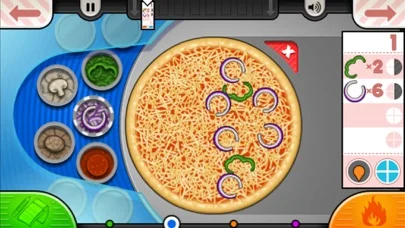
Every order moves through four distinct stations. At the Order Station, you monitor customers and their requests. At the Topping Station, you choose ingredients and place them on the pizza. The Bake Station asks you to manage oven timing, while the Cutting Station lets you determine how the finished pizza is divided.
This makes the gameplay loop more involved than simply selecting a recipe. You are switching between active orders and trying to keep several steps moving without losing track of what each customer requested. The official description specifically highlights drag, swipe, and tap controls, with station buttons positioned for thumb use. Order tickets can also be viewed in a zoomed-in mode, which is useful when several instructions need attention.
Accuracy creates the main tradeoff
The most important decision is where to spend your attention. Toppings need to be placed on the pizza, baking must stop at the right point, and the cutting line affects the final slices. The listing says Oven Alarms can alert you when a pizza is ready, while Oven Boosters speed up cooking. Cutting Guides can help with slice angles, and multi-touch allows both ends of a cutting line to be moved together.
These upgrades suggest a clear tradeoff: tips can be used to make later orders easier to manage, or they can be spent on visual improvements for the lobby. Players who enjoy optimizing a routine will likely appreciate that choice, while players who prefer immediate variety may find the repeated station sequence familiar over time.
Progression beyond individual orders
Successful service earns points and helps you level up. As progression continues, the shop unlocks new toppings and more customers, including 90 customers with unique orders. The game also includes challenging Closers, a Food Critic who can award a Blue Ribbon, paychecks, and 75 in-game achievements. These goals give the core process longer-term structure without changing its basic identity as a pizza-service game.
Tips have two uses. They can buy practical items such as alarms, boosters, and cutting guides, or they can fund lobby decoration. The lobby editor supports more than 140 customization items, including posters, furniture, and wallpaper, and the listing says each added item improves the Waiting Score. That creates a secondary management layer: efficiency tools support the kitchen, while decorations improve the customer waiting area.
Who should play it?
This is best suited to players who enjoy simulation games with clear instructions, incremental unlocking, and tactile interaction. Fans of restaurant progression may also find a natural comparison point in Township, while its decorating and upgrade structure may appeal to players who enjoy Homescapes or the broader routine-building of Hay Day.
The strongest aspect, based on the documented mechanics, is the way each order combines reading, timing, placement, and cutting into one compact routine. The main limitation is equally clear: the game is centered on pizza preparation and service, so its variety comes primarily from new ingredients, customers, challenges, achievements, and upgrades rather than from fundamentally different game modes.
Availability and buying details
Papa's Pizzeria To Go! is listed for iPhone and iPod touch on the Apple App Store, with a minimum requirement of iOS 8.0 in the supplied store information. A Google Play listing is also available for Android. The App Store record identifies the game as paid; check the official store page for the current purchase details. The listing says it is designed especially for smaller screens, so iPad users should check the store information and presentation before buying.
Sources
Download links point to official app marketplaces such as Google Play and the App Store when available. Always review store details before installing.
FAQ
What do you do in Papa's Pizzeria To Go!?
You run a pizza parlor by taking customer orders, adding toppings, baking pizzas, and cutting them into slices.
How do you progress through the game?
Keeping customers happy earns points and helps you level up. New toppings and customers unlock as your level rises, while tips can be spent on upgrades and lobby decorations.
How many customers and achievements are included?
The official listing describes 90 customers to unlock and 75 in-game achievements to earn.
What platforms support Papa's Pizzeria To Go!?
The game is listed on the Apple App Store for iPhone and iPod touch, and a Google Play listing is available for Android.
Editor's Choice Games















Papa's Pizzeria To Go!
Build the order, manage the rush, perfect the slice.
Additional Information:
Screenshots
Editor's Review:
Updated 2026-11-24
Papa's Pizzeria To Go! is a good fit for players who like structured, hands-on restaurant management rather than open-ended simulation. Its central challenge is simple to understand but demanding to execute: read each order, assemble the requested pizza, cook it correctly, and cut it cleanly. The official listing describes a paid mobile game from Flipline Studios, with progression built around customer satisfaction, new ingredients, shop improvements, and an expanding roster of visitors.
A four-station pizza workflow
Every order moves through four distinct stations. At the Order Station, you monitor customers and their requests. At the Topping Station, you choose ingredients and place them on the pizza. The Bake Station asks you to manage oven timing, while the Cutting Station lets you determine how the finished pizza is divided.
This makes the gameplay loop more involved than simply selecting a recipe. You are switching between active orders and trying to keep several steps moving without losing track of what each customer requested. The official description specifically highlights drag, swipe, and tap controls, with station buttons positioned for thumb use. Order tickets can also be viewed in a zoomed-in mode, which is useful when several instructions need attention.
Accuracy creates the main tradeoff
The most important decision is where to spend your attention. Toppings need to be placed on the pizza, baking must stop at the right point, and the cutting line affects the final slices. The listing says Oven Alarms can alert you when a pizza is ready, while Oven Boosters speed up cooking. Cutting Guides can help with slice angles, and multi-touch allows both ends of a cutting line to be moved together.
These upgrades suggest a clear tradeoff: tips can be used to make later orders easier to manage, or they can be spent on visual improvements for the lobby. Players who enjoy optimizing a routine will likely appreciate that choice, while players who prefer immediate variety may find the repeated station sequence familiar over time.
Progression beyond individual orders
Successful service earns points and helps you level up. As progression continues, the shop unlocks new toppings and more customers, including 90 customers with unique orders. The game also includes challenging Closers, a Food Critic who can award a Blue Ribbon, paychecks, and 75 in-game achievements. These goals give the core process longer-term structure without changing its basic identity as a pizza-service game.
Tips have two uses. They can buy practical items such as alarms, boosters, and cutting guides, or they can fund lobby decoration. The lobby editor supports more than 140 customization items, including posters, furniture, and wallpaper, and the listing says each added item improves the Waiting Score. That creates a secondary management layer: efficiency tools support the kitchen, while decorations improve the customer waiting area.
Who should play it?
This is best suited to players who enjoy simulation games with clear instructions, incremental unlocking, and tactile interaction. Fans of restaurant progression may also find a natural comparison point in Township, while its decorating and upgrade structure may appeal to players who enjoy Homescapes or the broader routine-building of Hay Day.
The strongest aspect, based on the documented mechanics, is the way each order combines reading, timing, placement, and cutting into one compact routine. The main limitation is equally clear: the game is centered on pizza preparation and service, so its variety comes primarily from new ingredients, customers, challenges, achievements, and upgrades rather than from fundamentally different game modes.
Availability and buying details
Papa's Pizzeria To Go! is listed for iPhone and iPod touch on the Apple App Store, with a minimum requirement of iOS 8.0 in the supplied store information. A Google Play listing is also available for Android. The App Store record identifies the game as paid; check the official store page for the current purchase details. The listing says it is designed especially for smaller screens, so iPad users should check the store information and presentation before buying.
Sources
Download links point to official app marketplaces such as Google Play and the App Store when available. Always review store details before installing.
FAQ
What do you do in Papa's Pizzeria To Go!?
You run a pizza parlor by taking customer orders, adding toppings, baking pizzas, and cutting them into slices.
How do you progress through the game?
Keeping customers happy earns points and helps you level up. New toppings and customers unlock as your level rises, while tips can be spent on upgrades and lobby decorations.
How many customers and achievements are included?
The official listing describes 90 customers to unlock and 75 in-game achievements to earn.
What platforms support Papa's Pizzeria To Go!?
The game is listed on the Apple App Store for iPhone and iPod touch, and a Google Play listing is available for Android.